





Leasing Solutions for Businesses
TV/Display Rentals for Trade Show Booths & Events: Resolution, Mounts/Stands, Setup & Data Protection
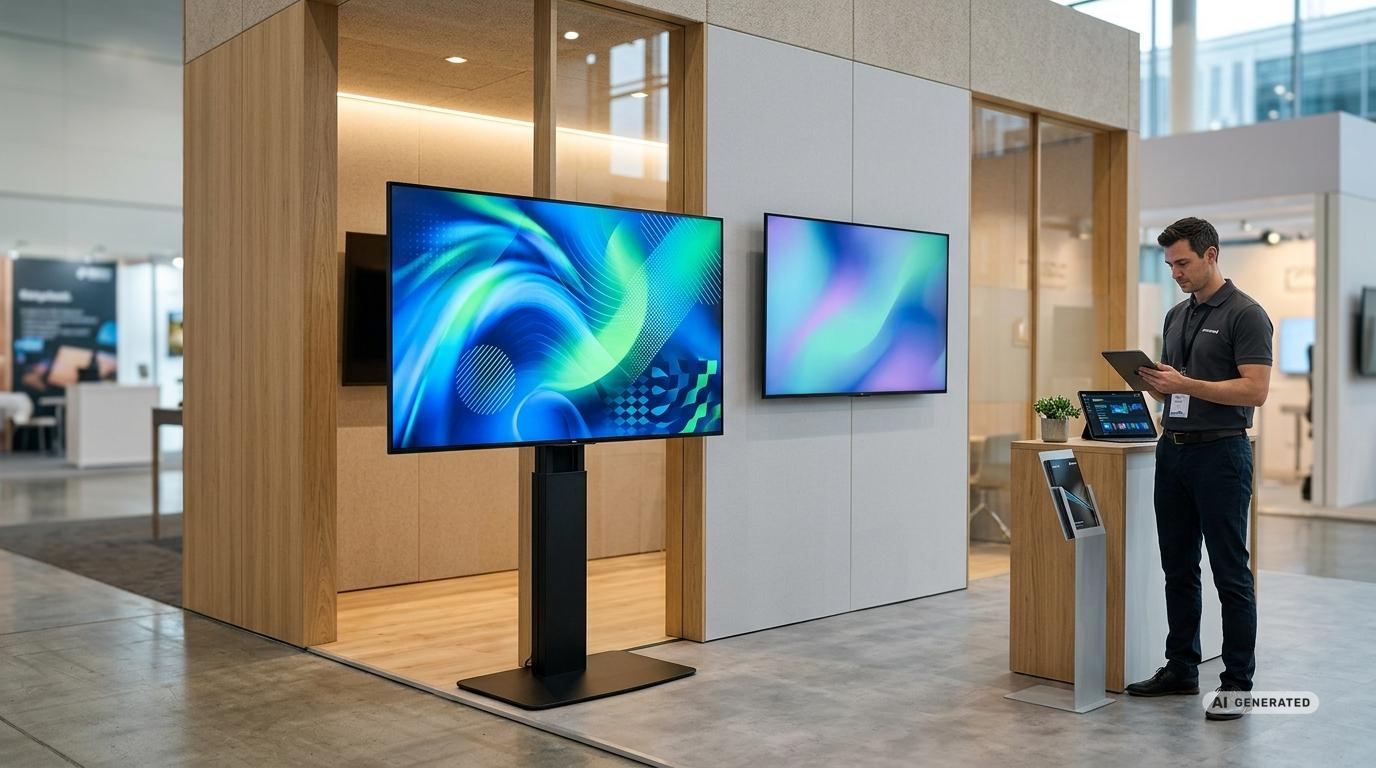
TV and Display Rental for Trade Show Booths and Events: Resolution, Mounts, Stands, Setup, and Data Protection
A large-format display is a key piece of presentation technology at many trade show booths and events. It displays product videos, live demos, presentations, schedules, brand messages, or interactive content. However, to ensure the presentation is truly compelling, it’s not enough to simply choose the largest possible screen size. Resolution, brightness, viewing distance, mounting, signal transmission, and data protection must all be tailored to the specific application.
Those who need displays only for a limited period of time can use the rental service for the equipment on a project-by-project basis. get-IT-easy offers a selection of displays for rental for this purpose. This reduces the organizational burden and allows for equipment tailored to the booth size, venue, duration, and content. Depending on the project, displays can be provided along with stands, mobile rolling stands, wall mounts, media players, laptops, cables, and other accessories.
Why the display at a trade show booth is more than just a screen
At a well-attended trade show, a booth is competing with numerous visual stimuli. A display must therefore convey its content clearly, quickly, and from different angles. Visitors often decide within a few seconds whether a presentation is relevant to them. An appropriate screen size, easily readable text, and clearly recognizable imagery help spark interest.
Displays can serve a variety of purposes. In the entrance area, they act as eye-catchers; at consultation points, they facilitate conversations; and during presentations, they visualize information for multiple people. Touchscreens also enable interactive product catalogs, configurators, forms, and applications. For such projects, a 55-inch touchscreen monitor, for example, might be a suitable option. Each task has different requirements in terms of size, resolution, placement, and operation.
Technical planning should therefore begin with the usage scenario. A high-resolution product video requires different equipment than a static schedule. A presentation with small tables poses different challenges than an eye-catching animation viewed from several meters away. For more information on planning such installations, see the article on digital signage at events.
Should you consider TV rental or professional display rental?
In everyday language, televisions and displays are often used interchangeably. For events, however, the difference can be significant. Traditional TV sets are primarily intended for personal media consumption. Professional displays, on the other hand, are often designed for presentations, digital signage, and extended operating hours. Depending on the model, they offer higher brightness, anti-glare surfaces, flexible orientation, and features for centralized content control.
For a short presentation in a room with controlled lighting, a TV set may be sufficient. At a brightly lit trade show booth, during an event lasting several days, or for continuous daily use, a professional display is often the more suitable solution. The decisive factor is not just the product category, but the specific technical features of the respective model. The “TVs and Monitors” category provides an overview of TVs available for rent.
| Application | Suitable Solution | Key Criteria |
|---|---|---|
| Product video at the trade show booth | Large-format 4K display | Brightness, anti-glare, viewing angle, and reliable playback |
| Presentation or Lecture | Display with stand or rolling stand | Readability, appropriate height, stable signal transmission, and audio |
| Interactive Product Catalog | Touchscreen with computer or media player | Response time, software compatibility, data protection, and secure installation |
| Directions and Schedule | Portrait-Oriented Display | Portrait mode support, automatic playback, and an easy-to-read layout |
| Bright Entryway | Bright, professional signage display | High luminance, low reflection, and optimized screen positioning |
| Large stage or spacious hall | Very large display, video wall, or LED solution | Viewing distance, scaling, signal distribution, and stability |
Determining the Right Display Size
The optimal screen size depends primarily on the viewing distance and the type of content. A 55-inch display can have a very prominent presence at a small consultation station, but may be too small when viewed from a distance. Conversely, a very large display at a compact booth can overwhelm visitors or take up valuable space.
For videos featuring large subjects, a greater viewing distance is less of an issue. Presentations, tables, technical drawings, and user interfaces, on the other hand, require significantly better readability. Small text should not be compensated for by requiring visitors to stand right in front of the screen. This makes the content harder to use and can block pathways on the booth.
When planning the layout, you should also take into account the booth design, furniture, sightlines, and potential obstacles. A display should not be obstructed by brochure stands, exhibits, or passing visitors. If there are multiple consultation areas, two medium-sized displays may be more practical than a single very large one. For larger presentation areas, 65-inch TVs are available, for example, provided the model and availability are suitable for the intended use.
Full HD, 4K, or 8K: Which Resolution Makes Sense?
For many modern trade show applications, 4K is a sensible choice. The resolution of 3,840 by 2,160 pixels enables detailed images, sharp text, and high-quality display on large screens. This requires that the source material also be of sufficient quality. A low-resolution video does not automatically look better on a large 4K display.
Full HD may still be sufficient if content is viewed from a greater distance or consists primarily of wide-angle videos and simple messages. For detail-rich applications, small text, or interactive product presentations, 4K offers significant advantages.
8K is generally not necessary for typical trade show booths. The visible added value depends heavily on screen size, viewing distance, and source material. At the same time, the demands on computer performance, file size, cables, and signal distribution increase. Rather than focusing exclusively on the highest resolution, the entire playback chain should be planned reliably.
Assessing Brightness and Anti-Glare Properly
Exhibition halls are often significantly brighter than conference rooms. Spotlights, illuminated booth walls, daylight, and adjacent presentation areas can cause reflections and reduce contrast. Therefore, a display’s brightness is an important selection criterion.
For many indoor environments, a practical guideline is approximately 300 to 700 candelas per square meter, depending on ambient light. In particularly bright areas, higher-performance displays may be required. Even more important than achieving the highest possible value is the interplay of luminance, contrast, surface treatment, and viewing angle. An anti-glare surface can significantly improve readability.
Higher brightness isn’t always better in every situation. A screen set to an extremely high brightness level can be uncomfortable in a dimly lit event room and consume unnecessary energy. Professional displays with a brightness sensor can adjust the display to match the ambient light. Alternatively, the settings can be adjusted manually during setup. Additional information on energy consumption and standby planning can be found in the article on energy efficiency for temporary setups.
HDR, Colors, and Visual Impact
HDR can display videos and images with higher contrast, vivid highlights, and more nuanced colors. This can offer a visible advantage for emotional brand videos, high-quality product visualizations, or creative applications. For spreadsheets, presentation slides, or simple information displays, however, HDR is rarely the most important criterion.
Consistent reproduction is key. When using multiple displays side by side, brightness, color temperature, and picture mode should be set as uniformly as possible. Different colors on adjacent screens can look unprofessional, even with well-produced content.
For long static displays, the display technology used should also be taken into account. Certain panel types may be more sensitive to logos, menus, or controls that remain on screen for extended periods. Moving content, changing images, and appropriate protection features reduce this risk.
Landscape or portrait orientation?
The classic landscape orientation is suitable for videos, presentations, and group screenings. Portrait orientation, on the other hand, can be useful for narrow display areas, digital posters, portraits, social media content, or directional signs. Not every device is designed for extended use in portrait orientation. Before making a selection, you should therefore check whether the model supports the desired orientation. For vertical and interactive presentations, devices from the digital kiosk category may also be relevant.
The content must also be prepared in the correct aspect ratio. A landscape-oriented video displayed on a portrait-oriented screen will result in large empty areas or be cropped awkwardly. Ideally, graphics, animations, and videos should be produced with the actual screen position in mind.
Stand, rolling stand, or wall mount?
The mounting solution affects safety, visibility, and appearance. A classic stand is suitable for presentation areas where the display will not be moved during the event. Mobile stands offer more flexibility and can be moved between the presentation area, reception, and meeting area. Casters should be securely locked during use.
Wall mounts allow for space-saving integration into the exhibition booth. This requires that the booth wall be able to support the weight of the display and the mount. For larger devices, the weight, center of gravity, mounting height, and mounting points must be coordinated with the booth builder well in advance. Depending on the setup, a suitable TV wall mount can be included in the customized rental package.
Many displays and mounts use standardized VESA mounting points. However, the correct hole spacing alone is not enough. The maximum load capacity, screw length, alignment, and total weight must also be compatible. For freestanding structures, it is also important to ensure that the base is sufficiently large and that the structure is highly stable against tipping. For devices between 32 and 70 inches, for example, a TV floor stand can be considered. Further planning tips are available in the guide to stands, mounts, adapters, and cables for event IT.
Safety at the Trade Show Booth
Displays, stands, and accessories must be set up in such a way that visitor pathways remain clear and no hazards are created. Particularly large, high-mounted, or freestanding structures require careful planning. The technical guidelines of the respective trade show venue and the stand builder’s specifications must be observed.
Cables must not create tripping hazards. They should be routed through cable channels, under suitable covers, or within the stand structure. Power supplies, power strips, and media players must be positioned in a way that protects them from accidental access while still allowing for adequate ventilation.
For height-adjustable or mobile systems, check to ensure that all locking mechanisms are engaged. The reach of visitors is also a factor. Freely accessible cables and controls can be accidentally disconnected or adjusted. For public areas, concealed connections and locked-out settings menus may be advisable.
The Setup: Media Players, Cables, and Signal Paths
A display requires a compatible source. This can be a laptop, a compact media player, a mini-computer, a tablet, or an integrated digital signage system. For a simple video loop, a media player or USB playback is often sufficient. Live presentations and interactive applications, on the other hand, usually require a high-performance computer. Suitable devices can be selected from the “Laptops for Rental” category and requested on a project-by-project basis.
HDMI remains a widely used connection. DisplayPort and USB-C are used primarily with computers. Modern interfaces support high resolutions and refresh rates, but not every cable and adapter automatically offers the full range of features. Key factors include resolution, refresh rate, color depth, cable length, and the capabilities of the source and display. A suitable HDMI cable can be planned for along with the rest of the hardware.
For typical 4K presentations, a stable transmission at 60 frames per second is often a good starting point. For long cable runs, active cables, optical solutions, or signal extenders may be necessary. Very high bandwidths—such as those enabled by current interface standards—are rarely fully required at a traditional trade show booth. Reliability is usually more important than theoretical maximum performance.
Adapters should be tested in advance. With USB-C in particular, it’s important to note that not every port can output a video signal. Copy protection, automatic resolution detection, and different frame rates can also lead to a black screen or brief signal dropouts. Additional adapters can be found in the “Rental Adapters” category.
Play content offline or over the network?
Local playback reduces dependence on the event network. Videos, images, and presentations are stored directly on the media player or playback device. For many trade show booths, this is the most reliable solution.
Cloud-based signage systems, on the other hand, offer advantages when content needs to be updated centrally during the event or when multiple displays need to be coordinated. This requires a stable and secure network connection. Trade show Wi-Fi can be heavily congested, which is why business-critical presentations should not rely exclusively on a public connection. If needed, rental routers can be included in the project planning. The article on Wi-Fi at events explains additional requirements for network design and secure guest access.
It is recommended to keep a local backup copy of the most important content. For particularly important presentations, a second playback device can also be prepared. This allows for a faster response in the event of a technical problem.
Plan Audio at the Display Wisely
Product videos often contain speech or music. However, in a noisy exhibition hall, built-in speakers may not always be sufficient. At the same time, high volume levels at the booth are often undesirable or limited by event regulations.
Alternatives include directional speakers, separate audio systems, or rental headphones at individual presentation stations. Subtitles are particularly useful because key messages remain understandable even without sound. They also improve accessibility and make it easier for international visitors to grasp the content.
Data Protection for Displays and Media Players
A display can store more data than is apparent at first glance. This includes Wi-Fi access credentials, app accounts, browser data, media content, login credentials, and information from connected digital signage platforms. Data protection becomes even more critical when it comes to touch applications, lead forms, sweepstakes, or personalized product configurators.
In accordance with the principle of data minimization, only the information that is actually necessary for the specific purpose should be collected. Login credentials should not be stored openly in the browser, and administrative accounts should not be used for public display. For trade show systems, time-limited user accounts with restricted permissions are recommended.
If personal data is collected, responsibilities, disclosure obligations, retention periods, and access rights must be clarified in advance. Visitor data should not be stored unencrypted on a freely accessible media device. Once the project is complete, data and accounts that are no longer needed must be deleted. Detailed information on this topic can be found in the article “Data Protection at Trade Show Booths.”
At get-IT-easy, customer data is removed from the devices after they are returned. The hardware is then cleaned, inspected, and prepared for its next use. For projects involving sensitive data, internal data protection requirements, or confidential information, certified data erasure can be requested.
Pre-configuration Saves Time on Site
Setting up a trade show booth often follows a tight schedule. If content, settings, and connections aren’t tested until shortly before the event begins, even minor compatibility issues can cause delays. Project-specific pre-configuration reduces this risk.
Depending on your needs, videos, apps, user accounts, display modes, and network settings can be set up in advance. Automatic playback upon startup, power-saving options, volume, and orientation can also be configured beforehand. When using multiple devices, a uniform configuration is particularly important. get-IT-easy offers project-specific configuration of rental devices for this purpose. The article on preconfigured devices for businesses also explains the organizational benefits this provides.
This information should be included in a display request
- Desired quantity and approximate screen size
- Rental period, as well as setup and takedown dates
- Delivery location, hall, booth number, and available time slots
- Landscape or portrait orientation
- Type of content, such as video, presentation, touchscreen application, or live demo
- Required resolution and available connections
- Preferred mounting option, such as a stand, rolling stand, or wall mount
- Requirements for a laptop, media player, cables, adapters, network, or audio
- Preferred pre-configuration and specific data protection requirements
- Need for insurance, setup, or technical support
The more complete this information is, the more accurately we can determine which equipment is suitable for your needs. The rental price is based on factors such as the type of equipment, quantity, rental duration, accessories, delivery method, configuration, and desired additional services. Starting prices are therefore for reference only. Customers will receive a customized quote via email.
Arrange Delivery, Setup, and Return
For available devices, express shipping or overnight shipping is possible within Germany, depending on the project. For large quantities, extensive pre-configuration, or specific delivery time windows, the process is coordinated on a case-by-case basis. Submitting a request early facilitates planning, especially for large trade shows and concurrent events.
For returns, get-IT-easy provides return labels and arranges pickup. The devices must be packed securely for transport. Unless otherwise agreed, delivery and pickup are included in the shipping costs. Secure, reusable boxes ensure safe transport and allow the hardware to be reused multiple times. For more information on these processes, see the article on sustainable logistics in IT.
FAQ on TV and Display Rentals
How long can a display be rented?
Rentals are available for as little as one day. The rental period can be planned to fit the setup, event, and teardown. Extensions are often possible, provided the equipment is available for the additional period.
What display size is suitable for a trade show booth?
That depends on the booth space, viewing distance, content, and desired impact. Medium-sized displays are often a good choice for compact consultation areas. Large, open booths and presentation areas require correspondingly larger displays or multiple displays.
Is 4K necessary for a trade show?
4K is particularly useful for large displays, highly detailed images, small text, and interactive applications. For simple videos viewed from a greater distance, Full HD may be sufficient. The source, cable, and display should reliably support the same target resolution.
Can stands and mounts be rented as well?
Yes. Depending on your needs, stands, rolling stands, mounts, and other accessories can be included in your customized quote. Load capacity, VESA mounting hole spacing, mounting height, and stability are taken into account to ensure compatibility with the device. For an overview, see the Stands and Wall Mounts category.
Can content be preloaded?
Pre-configuration is possible. This may include media content, apps, user accounts, settings, and project-specific requirements. The exact scope is agreed upon in advance.
What happens to stored data after return?
Customer data is removed from the devices after return. The hardware is then cleaned and inspected. If there are heightened data protection requirements, certified data erasure can be requested.
Is insurance available?
Device insurance can be added as an option and offers protection against theft or damage, among other things. In the event of damage or defects, get-IT-easy should be notified immediately. Theft must also be reported to the police.
Conclusion: The right display rental combines impact with reliable planning
A display can attract attention at a trade show booth, support consultations, and present complex content in an understandable way. This requires a well-thought-out combination of screen size, resolution, brightness, mounting, playback technology, and appropriate content.
Equally important are stable signal paths, secure cables, a robust installation, and clear handling of stored data. If these points are taken into account early on, the technology can be prepared and made ready for use.
get-IT-easy assists companies in selecting suitable displays and planning the necessary accessories. Through the inquiry form, you can specify the quantity, rental period, location, and desired additional services. Based on this information, availability and configuration requirements are assessed, and a customized quote is prepared.
Read more - You may also be interested in
Would you like to delve deeper into the topic or discover similar content? Below, we have compiled three additional articles for you that are thematically related to this article. These may also be relevant and interesting for your company.

Leasing Solutions for Businesses
TV/Display Rentals for Trade Show Booths & Events: Resolution, Mounts/Stands, Setup & Data Protection
TV and Display Rentals for Trade Show Booths and Events: Tips on resolution, mounts, stands,
Aug

Technology trends
5G & Alternative Event Internet: Wi-Fi/5G Setup, VoWiFi, and Stratospheric Internet—What’s Realistic?
A Look at Internet for Events in 2026: 5G, Wi-Fi Setup, VoWiFi, and Stratospheric Internet.
Jul
Guide
Pegasus & Mobile Spyware: How Companies Protect Company Devices While Traveling or at Events
Pegasus & Mobile Spyware: How Companies Can Securely and Efficiently Protect Company Devices While Traveling,
Leasing Solutions for Businesses
Which VR Headset Is the Best in 2026? – The Ultimate Comparison for Companies Looking for Virtual Reality Hardware Rental
Discover the best VR headsets of 2025 for businesses. Leverage our expertise for the optimal
Jun
Guide
Laptops for Video Editing in 2026: The Best Options for Creative Professionals
Laptop for Video Editing: Rental of the Best Performance, Graphics, and Storage—Perfect for Creative Projects!
Jun

Leasing Solutions for Businesses
iPhone vs. Samsung: Which smartphone is better suited for business use?
iPhone vs. Samsung: Which smartphone best suits your needs? A comparison of performance, design, and
Jun

Guide
Theft Protection for Rental Smartphones & Tablets at Events: Device Security, Tracking, MDM, and Apple/Android Features
Theft Protection for Rented Smartphones & Tablets at Events in 2026 ✔️: Top Strategies for
Jun

Guide
Leasing vs. long-term rental from a few devices: When is which model worthwhile?
Leasing vs. long-term rental from a few devices: When is which worthwhile? 2026 Decision-making aid
Apr